


After banging my head for some time, I found that this issue occurred due to the Assembly version of Microsoft.Crm.Reporting.RdlHelper,
TO FIX THIS ISSUE FOLLOW THE BELOW STEPS:
- Click on Report rdl file in solution explorer.
- Go to the Report section in the header in visual studio.
- Click on Report Properties, It will open property section.

Now go to References Tab and browse to the correct version of the assembly in the BidExtensions folder, even if the Microsoft.Crm.Reporting.RdlHelper is listed, it may be that this is the wrong version…
The earlier version of Microsoft.Crm.Reporting.RdlHelper was 7.0.0.0 so we need to update it to 9.0.0.0 in my case.
In our case it was located here C:WindowsMicrosoft.NETassemblyGAC_MSILMicrosoft.Crm.Reporting.RdlHelperv4.0_9.0.0.0__31bf3856ad364e35
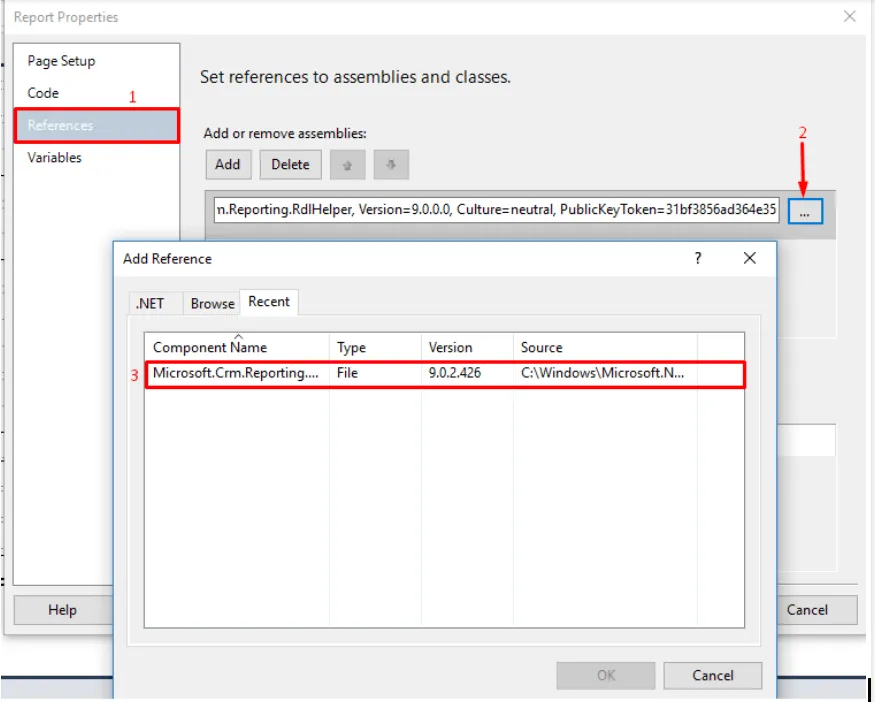
The exact location will depend on which version of the helper you have installed.
Remove any pre-existing references (which are not necessary or maybe different version of the dll).
I hope this will help you in solving your issue, signing off!
If you’re still experiencing issues, consider contacting our Microsoft Dynamics 365 Consultants. We have over eight years of Dynamics 365 development experience, and we can effectively help you quickly fix all kinds of complex issues.


